
Paintball Arena
A clearer view. For the whole team.
At Paintball Arena, NeoVerse’s booking solution supports the team from the first enquiry to payment on site.
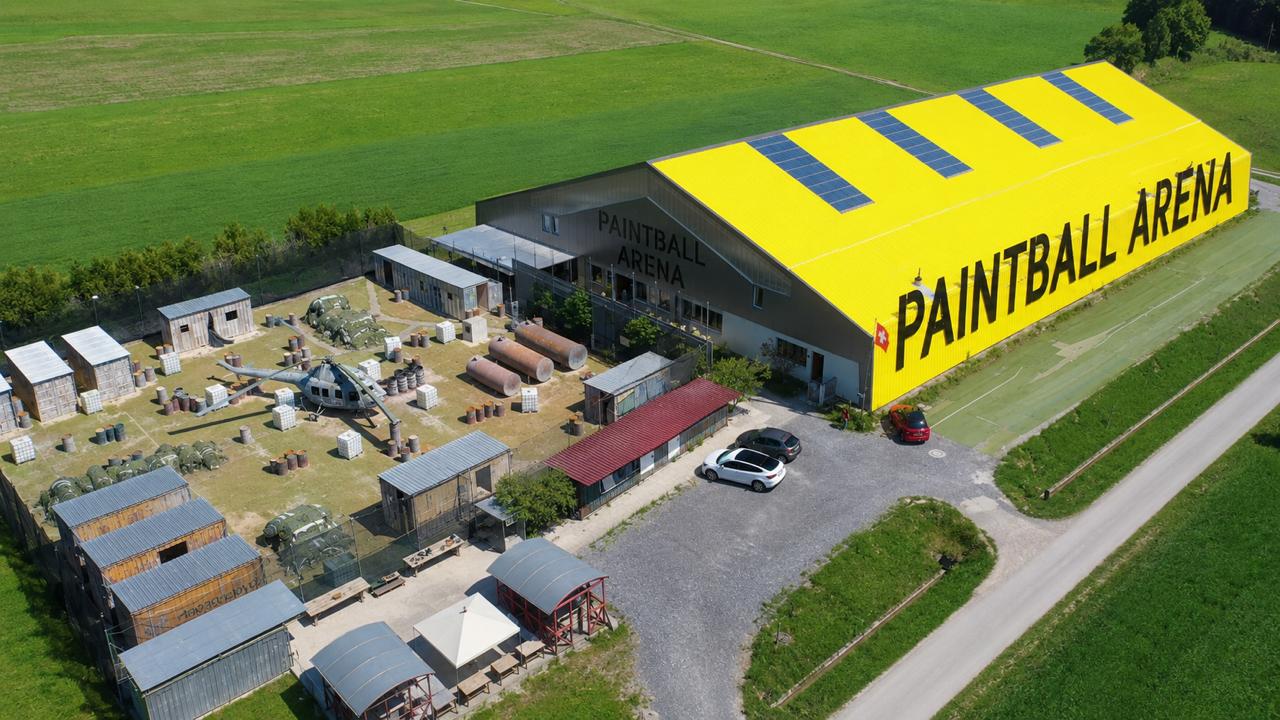
NeoVerse develops and operates Paintball Arena’s booking system. That practical experience informs LeisurOS.
Before and after
One group visit, played through twice.
Eight people, drinks, a company invoice: once with separate tools, once with LeisurOS.
- Tools holding booking data
- Before
4After1 - Times re-typed or matched by hand
- Before
4After0 - Slips and forms
- Before
9After0
Answer the enquiry by email and enter the date by hand in a calendar or spreadsheet.
Calendar / spreadsheetby hand
AfterThe guest books online. Only what is really free can be booked.
Request the deposit by bank transfer and follow up on the payment.
AfterThe deposit is paid online right when booking.
Have eight paper forms filled in, check them and file them.
Paper folderPaper × 8
AfterEvery person signs digitally on their own phone.
Note drinks and extra paintballs on a tally sheet.
Paper × 1
AfterThe group sheet on the tablet records what is used for the POS.
Type the amount and extras into the POS again and subtract the deposit by hand.
POSby hand
AfterThe open amount lands in the cart with one tap, the deposit already deducted.
Write the invoice again in the invoicing program.
Invoicing programby hand
AfterThe invoice is created from the booking, as a PDF with a QR payment slip.
Match the bank statement line by line against open invoices.
Invoicing programby hand
AfterImported bank statements match the payments.
Left: a typical example, not a measurement at a specific venue.
The decision
Why Paintball Arena relies on NeoVerse.
One booking, no handovers
Date, deposit, waiver, extras and invoice belong to one booking. Nothing gets lost.
The team is in control
No external support in between. Telegram reports new calls around the clock.
Guests do it in advance
Book, pay and sign on the phone. On the day, there is time for guests.
Your example walkthrough
Team Birke8 guests · Example: Saturday · 17:00–19:00DEMO-PA-001
Choose a chapter and take your time.


Book: The guest chooses paintball for eight people and the 17:00–19:00 slot. Online booking, phone assistant and team lead to the same record. Confirm: Private group: pay the deposit using the email link. Company example: the team confirms the booking for later invoice billing. Sign: Participants read the operator’s rules and sign individually. The QR code or link can be sent; a printed version is also possible. Arrive: On the booked day, the team checks in the group, explains rules and safety, and hands out overalls, gloves and paintball masks. Play & support: The team supports the group during two hours of play. Drinks and extra paintballs are recorded directly on the shared group sheet. Transfer to POS: After the game, the team selects the group sheet. Items, extras, example taxes and the deposit already paid determine the remaining amount. Guest reviews: On the customer display, the guest reviews items and prices, optionally adds a tip and confirms with a checkmark and signature. Checkout follows only afterwards. Complete: Private group: cash or card, deposit deducted, receipt via QR. Company example: invoice number, PDF and email are generated; the amount remains outstanding.
Read the full workflow
- Book
The guest chooses paintball for eight people and the 17:00–19:00 slot. Online booking, phone assistant and team lead to the same record.
- Confirm
Private group: pay the deposit using the email link. Company example: the team confirms the booking for later invoice billing.
- Sign
Participants read the operator’s rules and sign individually. The QR code or link can be sent; a printed version is also possible.
- Arrive
On the booked day, the team checks in the group, explains rules and safety, and hands out overalls, gloves and paintball masks.
- Play & support
The team supports the group during two hours of play. Drinks and extra paintballs are recorded directly on the shared group sheet.
- Transfer to POS
After the game, the team selects the group sheet. Items, extras, example taxes and the deposit already paid determine the remaining amount.
- Guest reviews
On the customer display, the guest reviews items and prices, optionally adds a tip and confirms with a checkmark and signature. Checkout follows only afterwards.
- Complete
Private group: cash or card, deposit deducted, receipt via QR. Company example: invoice number, PDF and email are generated; the amount remains outstanding.
Compare fairly
Ten questions for any booking system.
What matters is what happens after booking. Tick what your system can do.
- ✓Included
- ✓Included
- ✓Included
- ✓Included
- ✓Included
- ✓Included
- ✓Included
- ✓Included
- ✓Included
- ✓Included
Your system: 0 of 10 · LeisurOS: 10 of 10
You can try every point yourself in the demo.
What changed in daily operations
From the arena team’s daily work
Enquiries and emails previously went through external support with limited availability. For unusual bookings, the team on site sometimes lacked important details; some messages and enquiries were lost during handovers.
Today the team manages the workflow itself: calls and emails stay in view, while Telegram reports new activity around the clock.
How this fits your venue
Paintball is the example here. Set up your own offers, time slots, rules and extras. The team continues working on the same record.
Less routine work. More time for guests.
A voice agent can handle routine enquiries. Telegram keeps the team informed; shared records and automated invoices reduce manual work. Actual time and staffing needs depend on the venue.
Free slots can also be connected to the website as last-minute offers.
Is LeisurOS right for your venue?
Let’s find the workflows and modules your venue needs.
Try it free for 14 days